
Yes, an ordinary 8GB graphics card can give a whole photo library AI titles, descriptions, tags and semantic search. MiniCPM-V 4.7 1B tagged about 5,000 of my photos in around 5 hours on an RTX 4060 Ti 8GB. Every photo in my library of 7,642 now has an AI title, and I can search it by meaning ("something sweet for dessert") instead of by file name. Nothing left my PC.
This is Part 10 of my Local AI on an 8GB GPU series. In Part 9 I tested MiniCPM-V 4.7 1B on charts and text. This time I gave it a real job.
Can an 8GB GPU Tag Thousands of Photos?
Yes, and faster than I expected. My photo manager is a small app I wrote for my own library: about 8,956 files, of which 7,642 are photos and the rest are videos. Each photo needs three things from the AI: a short title, a 1–2 sentence description and 5–10 tags.
I started on 13 October with gemma4 through Ollama. It finished 2,513 photos in 4.2 hours, about 6.0 seconds per photo. Then I switched to MiniCPM-V 4.7 1B on llama.cpp for the rest. It did about 5,000 photos in roughly 5 hours, about 3.6 seconds per photo, including the app's own work of loading thumbnails and saving to the database.
| Run on RTX 4060 Ti 8GB | Model size | Photos | Time | Per photo |
|---|---|---|---|---|
| gemma4 (Ollama), 13 Oct | 9.6 GB download | 2,513 | 4.2 h | 6.0 s |
| MiniCPM-V 4.7 1B Q4_K_M (llama.cpp) | 1.8 GB (model + vision projector) | ~5,000 | ~5 h | ~3.6 s |
| MiniCPM-V 4.7 1B, model calls only (12-photo re-test, 17 Oct) | same | 12 | 27 s | 2.2 s (1.6–3.3) |
Those two big runs weren't a lab benchmark. They ran on different days and the gemma4 run had a few server restarts. Still, the pattern is clear. A 1.8 GB model fits easily in 8 GB of VRAM. The 9.6 GB gemma4 download doesn't, so part of it has to run on the CPU, and that costs time.
Why Use a 1B Vision Model Instead of a Bigger One?
Because a photo title doesn't need a genius. "Koala reaching for eucalyptus leaves" is a good title, and a small model writes it in about two seconds. When you multiply that by thousands of photos, speed matters more than the last bit of quality.
I wrote about choosing between local and cloud models in Local LLM vs Cloud API. For family photos, local wins easily: thousands of private pictures never get uploaded anywhere.
How Does Semantic Photo Search Work?
It searches by meaning, not by exact words. The setup has four parts, and they all run on my own machine:
- Caption. MiniCPM-V 4.7 1B looks at each photo's thumbnail and writes a title, a description and tags. It runs on llama.cpp (build b11643), because Ollama 0.40.4 can't load this model yet.
- Combine. The app joins the tags, categories, title and description into one short text per photo.
- Embed. nomic-embed-text, a 274 MB model in Ollama, turns that text into a vector: a list of numbers that represents its meaning.
- Search. The vectors live in PostgreSQL with pgvector. When I type a search, it is embedded the same way and the closest photos come back, ranked by cosine distance.
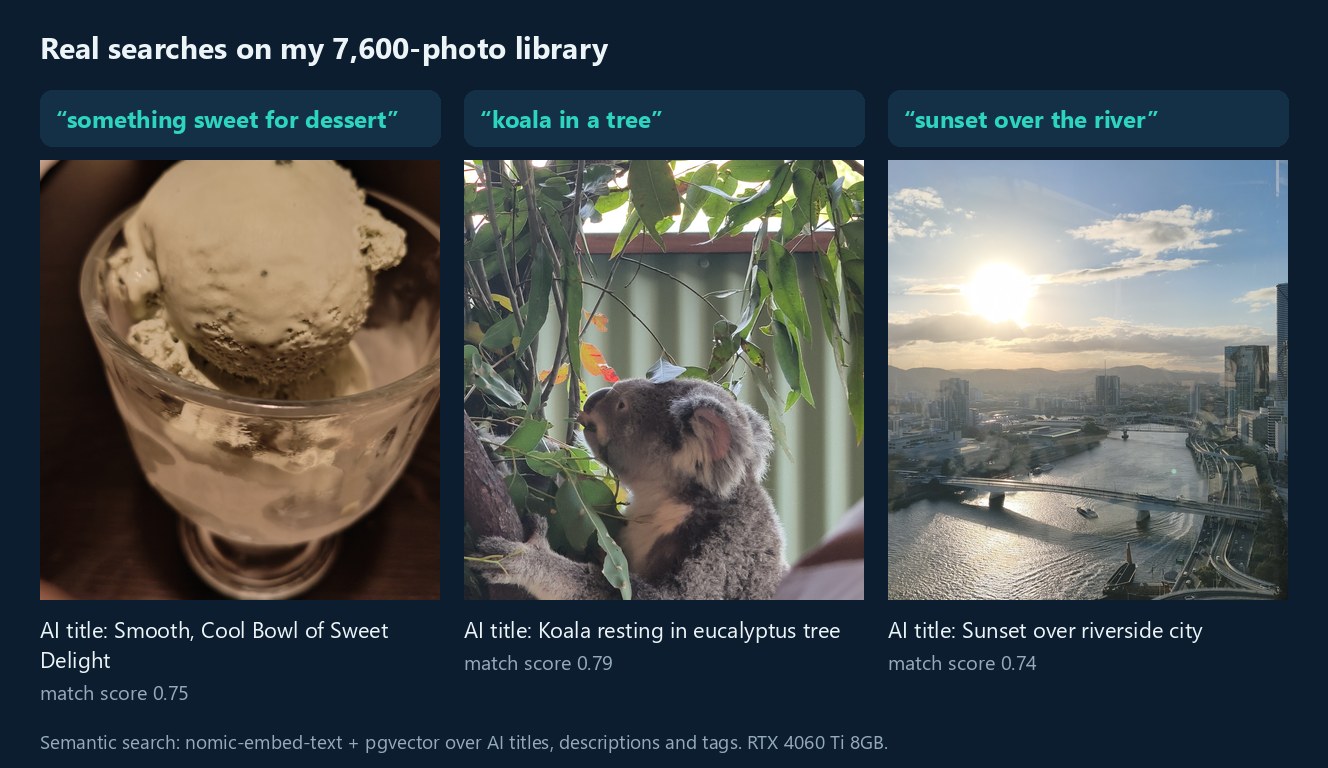
The nice part is that the search understands loose wording. I searched "something sweet for dessert", and the top results were all desserts, mostly bowls of ice cream. None of their tags contain "something sweet". Once the embedding model is loaded, a search over 7,724 embedded items takes about 0.1 seconds. The first search after a restart took 4.5 seconds while the model loaded.
This is a text-first setup: the photos are searched through what the AI wrote about them. In EmbeddingGemma 2 On-Device Multimodal Search I looked at the other approach, embedding the images directly. A text-first setup has one big advantage for me: I can read and fix what the AI wrote.
How Accurate Are the AI Titles and Tags?
The titles and descriptions are mostly right. The tags need cleaning. To check, I re-ran MiniCPM-V 4.7 1B live on 12 photos with the app's exact prompts.
- Good: it correctly described a koala reaching for leaves, ice cream in a glass, and a beach with tyre tracks and a bus parked on the sand.
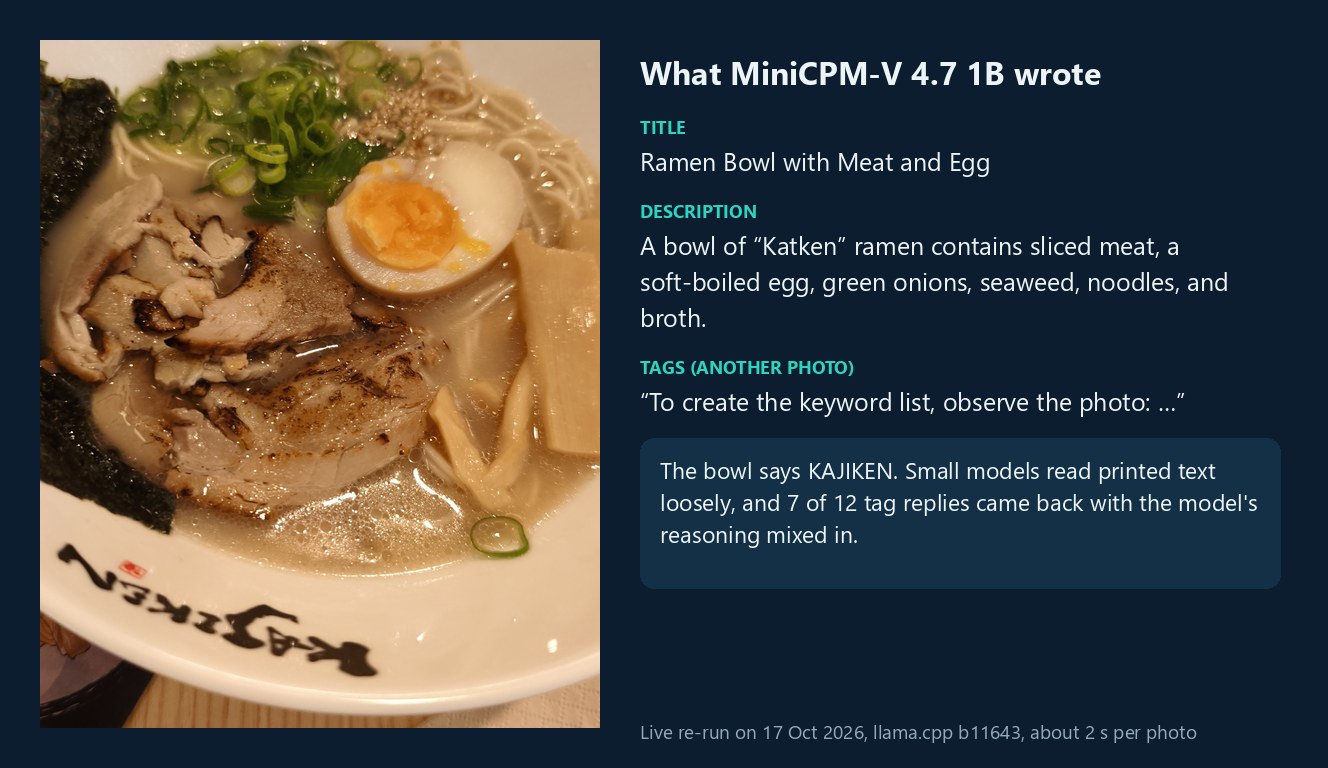
- Printed text is weak: the ramen bowl clearly says KAJIKEN, but MiniCPM wrote "Katken". Other photos from the same lunch got "Kazuken", "Koyuzan" and "Koyama". The real place is in my Kajiken Brisbane review.
- Small details slip: an afternoon photo of the river was called a "sunrise".
- Tags leaked its reasoning: in 7 of 12 tag replies, MiniCPM explained itself first, with lines like "To create the keyword list, observe the photo: …". The app splits replies on commas, so that sentence turned into junk tags such as "i identify key elements in the photo".
None of this breaks the search, because the title and description still carry the meaning. But it does make the tag list messy, and I'll fix that next.
What Would I Change Next Time?
Three things, all small:
- Clean the tag reply before saving it. Keep only the text after the last colon and drop any "tag" longer than a few words.
- Turn the model's thinking off for tags. In my Part 9 tests, llama.cpp with thinking off stopped this kind of leak.
- Don't trust printed names. For shop names and signs, I'll add the correct name myself, or let a bigger model check only those photos.
The search also gave me something I didn't plan for. My photo manager has a read-only API, so an AI agent can now pick photos for a blog post by searching for "koala" or "sunset over the river". That is how the real photos in this article were chosen, and I checked each one by eye afterwards.
Is Local AI Photo Search Worth Setting Up?
For a big family library, I think yes. The tagging took a few hours of background work on a graphics card I already had. The photos never left my computer, and now I can find "that koala photo" in a second instead of scrolling through years of camera rolls.
If you only have a few hundred photos, it isn't worth the setup. Google Photos or Apple Photos search is fine for that. Once you have thousands of photos that you don't want to upload anywhere, a small vision model on an 8GB card does the job.
If you like real photos, my Japan night park gallery and UQ Lakes jacarandas pages show some of the library this search now covers. If you try a setup like this yourself, I'd like to hear how it goes on the contact page.
Sources and How I Tested
- My own runs on an RTX 4060 Ti 8GB: the batch log from 13 Oct 2026 (gemma4), my own MiniCPM run (about 5,000 photos in about 5 hours), and a timed live re-run of 12 photos on 17 Oct 2026 with llama.cpp b11643 and the app's own prompts.
- Library counts from my photo manager's database on 17 Oct 2026: 7,642 photos, 7,638 with AI titles, 7,724 embedded items, 7,335 distinct tags.
- Model: openbmb/MiniCPM-V-4.7-1B (Apache-2.0). Embeddings: nomic-embed-text. Vector search: pgvector.
Checked 17 October 2026. The cover image was made locally with Qwen Image 2.1; the other images are my own photos and real search results. AI helped me research and edit this article.